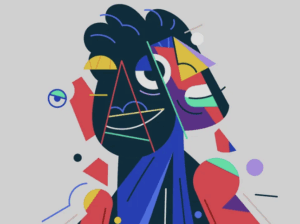
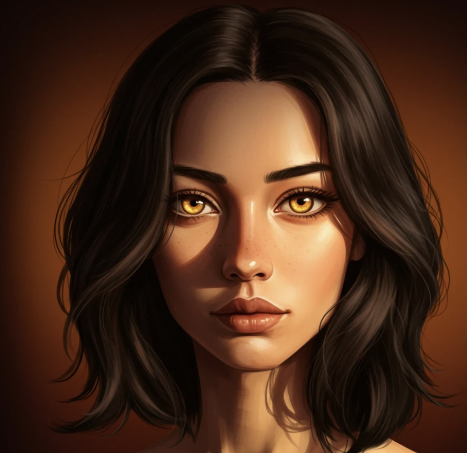
Art 2D Digital Illustration is the creation of narrative or decorative imagery using digital tools to simulate or expand upon traditional drawing and painting techniques within a two-dimensional plane.
Unlike 3D modeling, which builds a virtual object that can be rotated, 2D illustration deals with flat imagery (height and width). It is the bridge between traditional fine art skills (anatomy, perspective, composition) and modern software capabilities (layers, “undo,” effects).
Here is a minute, detailed breakdown of the ecosystem of 2D Digital Illustration.
1. The Physics of the Image: Raster vs. Vector
In digital illustration, the first decision an artist makes is the mathematical format of the image.
A. Raster (Bitmap) Illustration
The Atom: The Pixel (Picture Element). The image is a grid of colored squares.
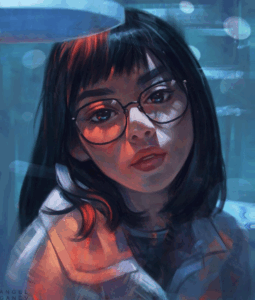
Aesthetic: Painterly, textured, organic. Capable of complex color blending and soft gradients.
Behavior: Resolution Dependent. If you scale a raster image up, the computer invents new pixels based on averages (interpolation), resulting in a blurry or blocky image.
Primary Use: Digital painting, concept art, photo manipulation, matte painting.
Software: Adobe Photoshop, Procreate, Corel Painter.
B. Vector Illustration
The Atom: The Path (Bezier Curve). The image is defined by mathematical points (nodes) connected by lines and curves.
Aesthetic: Clean, crisp, geometric, “flat.”
Behavior: Resolution Independent. You can scale a vector illustration from a business card to the side of a Boeing 747, and the lines will remain perfectly sharp because the computer recalculates the math.
Primary Use: Logos, icons, typography, infographics, clean commercial illustration.
Software: Adobe Illustrator, Affinity Designer, Inkscape.
2. The Hardware: Input Devices
Digital illustrators rarely use a mouse. They use hardware designed to mimic the hand-eye coordination of drawing.
Pen Tablets (Graphics Tablets): A plastic slate connected to the computer. The user draws on the slate while looking at the monitor. It requires a learning curve to disconnect the hand from the eye. (Standard: Wacom Intuos).
Pen Displays: A monitor with a pressure-sensitive glass screen. The user draws directly onto the image. (Standard: Wacom Cintiq).
Standalone Tablets: Portable computers with integrated drawing capabilities. The iPad Pro with the Apple Pencil has revolutionized the industry, allowing professional illustration to happen anywhere.
Key Hardware Specs:
Pressure Sensitivity: The tablet detects how hard you press. Light pressure = thin/faint line; Heavy pressure = thick/dark line. Professional standard is 8,192 levels of pressure.
Tilt Support: The stylus detects the angle of the pen, allowing for broad shading strokes like a real pencil.
3. The Software: The “Big Three”
While there are dozens of apps, three dominate the professional market.
1. Adobe Photoshop: The industry standard. Originally for photos, it is now the powerhouse for raster painting due to its robust brush engine and adjustment layers.
2. Procreate: An iPad-exclusive app. Loved for its intuitive gesture controls (two-finger tap to undo) and “Time-lapse” recording feature, which is vital for social media marketing.
3. Clip Studio Paint: Specialized for Comics and Manga. It features stabilization (smoothing shaky lines) and 3D reference models built directly into the canvas.
4. Core Techniques (The Digital Advantage)
Digital illustration offers tools that are physically impossible in traditional media.
A. Layers and Blend Modes
Layers: Stacked transparent sheets. You can paint the character on one layer and the background on another. This allows you to move or resize the character without ruining the background.
Blend Modes: Mathematical formulas that determine how a layer interacts with the layer below it.
Multiply: Darkens the image (used for shadows).
Screen/Overlay: Lightens the image (used for highlights and glowing effects).
B. Non-Destructive Editing (Masking)
Instead of erasing pixels (which destroys them), digital artists use Masks.
Layer Mask: You paint with black to hide pixels and white to reveal them. If you make a mistake, you just switch to white paint to bring the image back.
Clipping Mask: A layer is locked to the shape of the layer beneath it. This allows an artist to paint texture on a character’s shirt without going outside the lines.
C. Custom Brushes
Artists can program brushes to stamp complex shapes. You can have a “Leaf Brush” that paints a realistic forest in seconds, or a “Chainmail Brush” for armor textures.
5. Color Profiles: RGB vs. CMYK
RGB (Red, Green, Blue): Additive color (Light). Used for screens. It has a wide gamut (range of colors), including neon and bright saturations.
CMYK (Cyan, Magenta, Yellow, Black): Subtractive color (Ink). Used for printing. It has a narrower gamut. Bright neons on a screen will look dull when printed.
Marketplace Note: Digital files sold for download should be RGB. Files meant for physical prints should ideally be checked in CMYK.
6. Marketplace Categories for 2D Illustration
When organizing your SEO MUNIZ strategy, these are the high-value search terms for this medium:
Concept Art: Exploratory illustrations used to design characters, environments, or props for movies and video games (not meant to be the final product).
Character Design: A complete breakdown of a character (front, side, back views) for animation or comics.
Editorial Illustration: Conceptual art created to accompany articles in magazines or newspapers (often metaphorical).
Vector Assets: Scalable icons, patterns, and logos sold to other designers.
Fan Art: Illustrations of existing IP (Copyright issues apply here, but it is a massive market).
Digital Illustration
Feature Traditional Illustration Digital Illustration
Texture Physical, random, tactile Simulated, controlled
Workflow Linear (cannot easily undo) Iterative (Undo, Layers)
Output One original physical object Infinite digital copies
Color Mixing pigments (Subtractive) Mixing light (Additive)
Speed Slow (drying time) Fast (instant dry)
You now possess the complete “Taxonomy of Art” required for your platform. We have covered:
1. Fine Art: (Paintings, Sculpture).
2. Graphic Art: (Prints, Drawings).
3. Decorative Art: (Furniture, Glass, Ceramics).
4. Digital/New Media: (Raster, Vector, AI, NFTs).
Route
Art Galerie Marketplace
Avenida Raja Gabaglia, 2000 - Sala 930 - Torre 01 - Estoril
Belo Horizonte, Minas Gerais 30.494-170 Brazil
Secondary phone: +55 31 99506-1099
Email: service@artgalerie.com.br
URL: https://artgalerie.com.br/
| Monday | Open 24 hours Open now |
| Tuesday | Open 24 hours |
| Wednesday | Open 24 hours |
| Thursday | Open 24 hours |
| Friday | Open 24 hours |
| Saturday | Open 24 hours |
| Sunday | Open 24 hours |