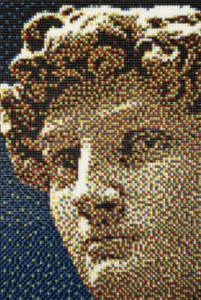
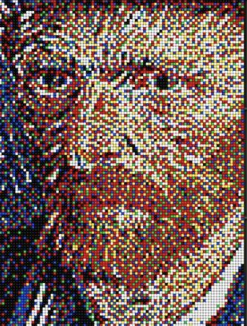
Pixel Art is a form of digital art where images are created and edited at the pixel level. The defining aesthetic of pixel art is that the individual square blocks of color (pixels) are visible and form the building blocks of the image, much like the tiles in a mosaic or the stitches in cross-stitch.
It originated from the technical limitations of early video game consoles and computers (8-bit and 16-bit eras), but it has evolved into a deliberate artistic style that celebrates precision, limitations, and nostalgia.
Here is a minute, detailed breakdown of the ecosystem of Pixel Art.
1. The Fundamental Unit: The Pixel
In standard digital photography, high resolution is the goal (you want to hide the pixels). In Pixel Art, the pixel is the subject.
Grid Logic: Every pixel art piece exists on a strict grid. A pixel cannot be “halfway” between two grid cells. It is either there, or it isn’t.
Resolution: Pixel art is defined by low resolution. Common canvas sizes are tiny by modern standards:
Sprite Size: $16 |times 16$, $32 |times 32$, or $64 |times 64$ pixels.
Scene Size: $320 |times 240$ (QVGA) is a classic resolution.
No Anti-Aliasing: This is the golden rule. “Anti-aliasing” is when the computer automatically adds blurry grey pixels to smooth out jagged lines. Pixel artists create “jaggies” intentionally. They use hand-placed anti-aliasing (manually placing lighter pixels) to soften curves without using the computer’s blur algorithms.
2. Core Techniques
Pixel art requires a unique set of skills that differ from drawing or painting.
A. Dithering
This is the technique of creating the illusion of a third color by interlacing two other colors in a pattern (usually a checkerboard).
Why it exists: In the 1980s, computers had very limited color palettes (e.g., 16 colors). If you had black and white but needed grey, you couldn’t just pick grey. You had to mix black and white pixels in a checkerboard pattern.
Modern usage: Used for texture (to make things look rough or retro) and shading.
B. Anti-Aliasing (AA)
Manually smoothing “staircase” lines (jaggies).
The Problem: A diagonal line made of squares looks jagged.
The Solution: The artist places pixels of an intermediate color at the “corners” of the steps to trick the eye into seeing a smooth curve.
C. Clusters
A cluster is a group of pixels of the same color that touch each other.
Bad Pixel Art: Has “orphan pixels” (single isolated pixels) or “noise” (random pixels).
Good Pixel Art: Is made of clean, readable clusters. The eye reads the shape of the cluster, not the individual dots.
D. Isometric Projection
A method of drawing 3D objects in 2D space without perspective convergence.
The Rule: Lines move at a 26.565-degree angle (which translates to a 2:1 pixel ratio: move 2 pixels over, 1 pixel up).
Usage: Massive in strategy games (SimCity, Civilization) and architectural pixel art because objects don’t get smaller as they get further away, allowing for consistent tiling.
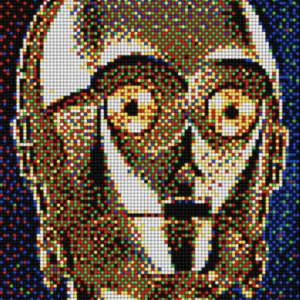
3. The Color Palette
In pixel art, you do not use the color picker randomly. You build a strict Palette.
Color Count: Purists often stick to strict limits (e.g., the NES Palette of 54 colors, or the GameBoy palette of 4 shades of green).
Ramps: A sequence of colors used to shade a specific object (e.g., Dark Red $|rightarrow$ Med Red $|rightarrow$ Light Red $|rightarrow$ White Highlight).
Hue Shifting: A pro technique. Instead of just making a color darker for shadow, you shift the hue.
Example: To shade a yellow sun, don’t use dark yellow. Use Orange or Red. Shadows in nature are rarely just “darker versions” of the base color; they are cooler or warmer.
4. Animation: The Sprite Sheet
Pixel art animation is done frame-by-frame (like traditional Disney animation).
Sprite Sheet: A single large image file containing every frame of animation grid-lined together. The software reads “Frame 1” from coordinates X,Y, then “Frame 2,” and so on.
Sub-Pixel Animation: A technique where the object doesn’t move a whole pixel, but the internal colors change to imply movement (e.g., the breathing motion of a character where only the chest highlight moves up one pixel).
5. Styles of Pixel Art
A. 8-Bit (NES Style)
Constraints: Extremely limited palette (often 3 colors per sprite + transparency). No transparency layers.
Look: Blocky, simple shapes, high contrast. (e.g., Super Mario Bros, Shovel Knight).
B. 16-Bit (SNES | Genesis Style)
Constraints: More colors (256 colors), complex shading, larger sprites.
Look: More realistic, detailed backgrounds, use of dithering. (e.g., Chrono Trigger, Stardew Valley).
C. Hi-Bit (Modern Pixel Art)
No Constraints: Using pixel aesthetics but with modern lighting engines, infinite colors, and fluid physics.
Look: Gorgeous, atmospheric, highly detailed landscapes. (e.g., Octopath Traveler, Hyper Light Drifter).
6. Tools of the Trade (Software)
Pixel artists do not use Microsoft Paint (usually). They use specialized software.
Aseprite: The industry standard. Paid software specifically designed for pixel art and animation. It has “onion skinning” (seeing the previous frame) and tile-mapping features.
Pyxel Edit: Excellent for creating tilesets (repeating patterns for game backgrounds).
GraphicsGale: A classic, free tool used by many Japanese game developers.
Piskel: A free, browser-based tool good for beginners.
7. Marketplace Categories
If you sell Pixel Art, these are the asset types collectors and developers look for:
1. Game Assets: “Sprite Packs” containing a character walking, jumping, and attacking.
2. Tilesets: Modular blocks (grass, dirt, stone, water) that can be painted together to build a game world.
3. UI Elements: Pixelated health bars, menu buttons, and fonts.
4. Fine Art | Prints: Highly detailed, large-scale pixel “paintings” (often cyberpunk cityscapes) sold as Giclée prints.
5. Profile Pictures (PFPs): As discussed in the NFT section, pixel art is the dominant aesthetic for crypto-collectibles (CryptoPunks).
Pixel Art
Feature Vector Art Pixel Art
Edge Perfectly smooth curves Jagged steps (aliased)
Scaling Infinite Must scale by whole integers (200%, 300%)
File Type SVG, AI, EPS PNG, GIF
Aesthetic Modern, Clean, Corporate Retro, Nostalgic, Indie
Skill Math/Shape manipulation Dot placement | Optical illusion
Route
Art Galerie Marketplace
Avenida Raja Gabaglia, 2000 - Sala 930 - Torre 01 - Estoril
Belo Horizonte, Minas Gerais 30.494-170 Brazil
Secondary phone: +55 31 99506-1099
Email: service@artgalerie.com.br
URL: https://artgalerie.com.br/
| Monday | Open 24 hours Open now |
| Tuesday | Open 24 hours |
| Wednesday | Open 24 hours |
| Thursday | Open 24 hours |
| Friday | Open 24 hours |
| Saturday | Open 24 hours |
| Sunday | Open 24 hours |